Try the echo service
System context
In order to get you started, we created an example application, that receives micropayments and some parameter over a http-request - and simply echos this parameter when the micropayment was valid. Please follow the microraiden installation instructions and the instructions to set up geth.
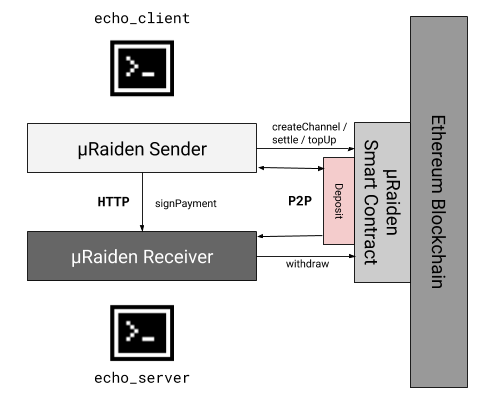
Schematic overview of a machine-to-machine µRaiden application [3]
Starting the µRaiden Receiver
Before starting the receiver, it needs to be assigned a private key with some TKN. Navigate to ./microraiden/microraiden/examples and create a new file containing your private key as exported in the Blockchain Setup guide by MetaMask. The file should be named pk_tut.txt.
From the root directory of µRaiden, start:
python microraiden/examples/echo_server.py --private-key microraiden/examples/pk_tut.txt
Starting the µRaiden Sender
To actually start the request for resource /hello, we will fire up the µRaiden client with the prefunded account.
While the Receiver is still running (in another terminal window for example), execute this command from the µRaiden root folder:
python microraiden/examples/echo_client.py --private-key microraiden/examples/pk_tut.txt --resource /echofix/hello
After some seconds, you should get the output
INFO:root:Got the resource /echofix/hello type=text/html; charset=utf-8:
hello
- This means:
- a channel has been created
- a deposit of 50 aTKN has been escrowed
- a micropayment of 1 aTKN has been transferred to the receiver
- the receiver returned the requested resource (the “hello” parameter in this simple case) for this payment
Congratulations, you just performed your first micropayment!
Footnotes
| [1] | All robot icons made by Freepic from http://www.flaticon.com. |
| [2] | Raspberry PI Pictograms by TinkTank.club |
| [3] | All other icons from http://icomoon.io IcoMoon Icon Pack Free, licensed under a Creative Commons Attribution 4.0 International License |